Frequently Asked Questions
Answers about memberships, the T3 Indicator Suite, Discord access, and getting set up with Trade The Trigger.
What is TradeTheTrigger.com?
TradeTheTrigger.com is a service and online community for traders by traders that creates tools and data resources.
Is TradeTheTrigger.com free?
We offer our tools and resources to users either as a premium service or in some cases at no cost. To see our list of tools and what they cost please visit our membership page.
How can I contact you?
You can reach our Support Team by opening a ticket in the support-ticket Discord channel. If you are not already in the Discord, please visit https://tradethetrigger.com/discord/ to gain access.
Is this trading advice?
No, nothing on this site should be considered trading advice. It is incumbent upon all users to do their own due diligence before investing in any stock ETF, or any other form of investable vehicle suffice to say we’re not telling you what to do with your money and should have no expectation that anything said done, written or otherwise disseminated from this service is advice from a financial advisor.
I use different email addresses everywhere...
These days, many folks are saying:
“I’m a bit paranoid and I use different email addresses on Discord, YouTube, Twitch, and TradingView. Also, I have a sub basement full of freeze-dried meat and booby traps on all my doors and windows.
Will I be able to add all of these accounts to my TradeTheTrigger.com account without issue while I await the end times?”
Rest Easy my friend, as Trade The Trigger uses your unique handle on all the streaming services to provide a connection to your account here on our site. Discord uses an authentication method that requires you to be logged in to the service already either on the web or in the app to connect to our site using tokens, this makes for a more secure connection and allows you to have different credentials while still connecting your accounts.
Please visit you Profile Page to provide your third-party account usernames for access to features and services we provide on various platforms.
so “Prep-on our paranoid friend!”
My indicators don’t match the ones on the show!
If you are a Pro Trader user and are not seeing indicators that line up with the ones you are seeing on the show it is likely due to the fact that your chart is not set to show pre and post market. To fix this, while in a chart with your indicators please click on settings or right click on the chart and go to settings. then, under the symbols tab select “Extended Trading Hours” you may need to close and reopen the chart for the indicators to properly reflect this change.
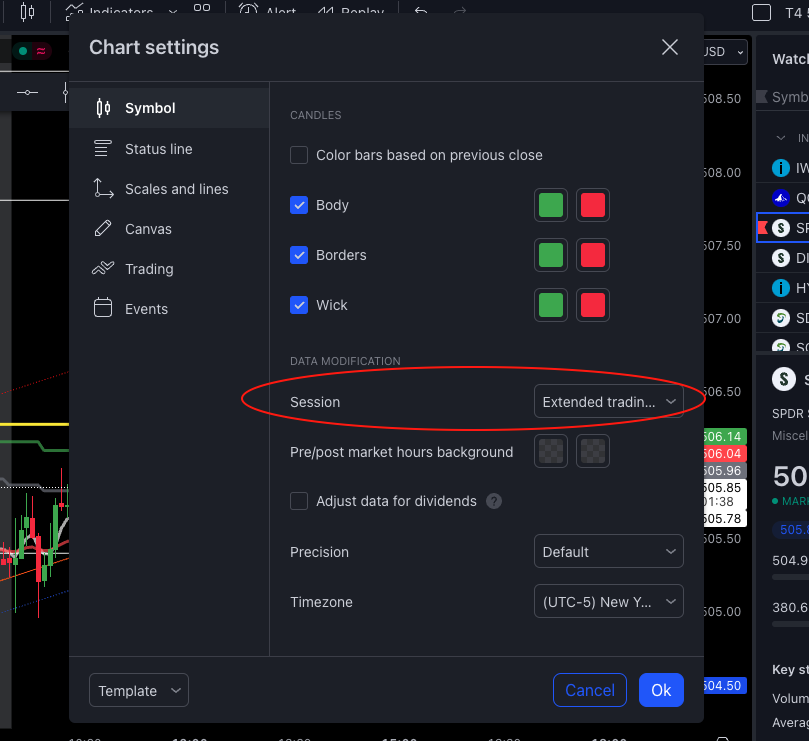
At the bottom right of your chart, you should see “ETH”, and well as a blue “ADJ”:

Here’s a great Twitch clip for solving a few other common issues you may be having: https://clips.twitch.tv/FrigidGeniusPenguinTTours-Fk1PlRQD5glZjxyV
How do I add the Levels and/or Triggers to my TradingView charts?
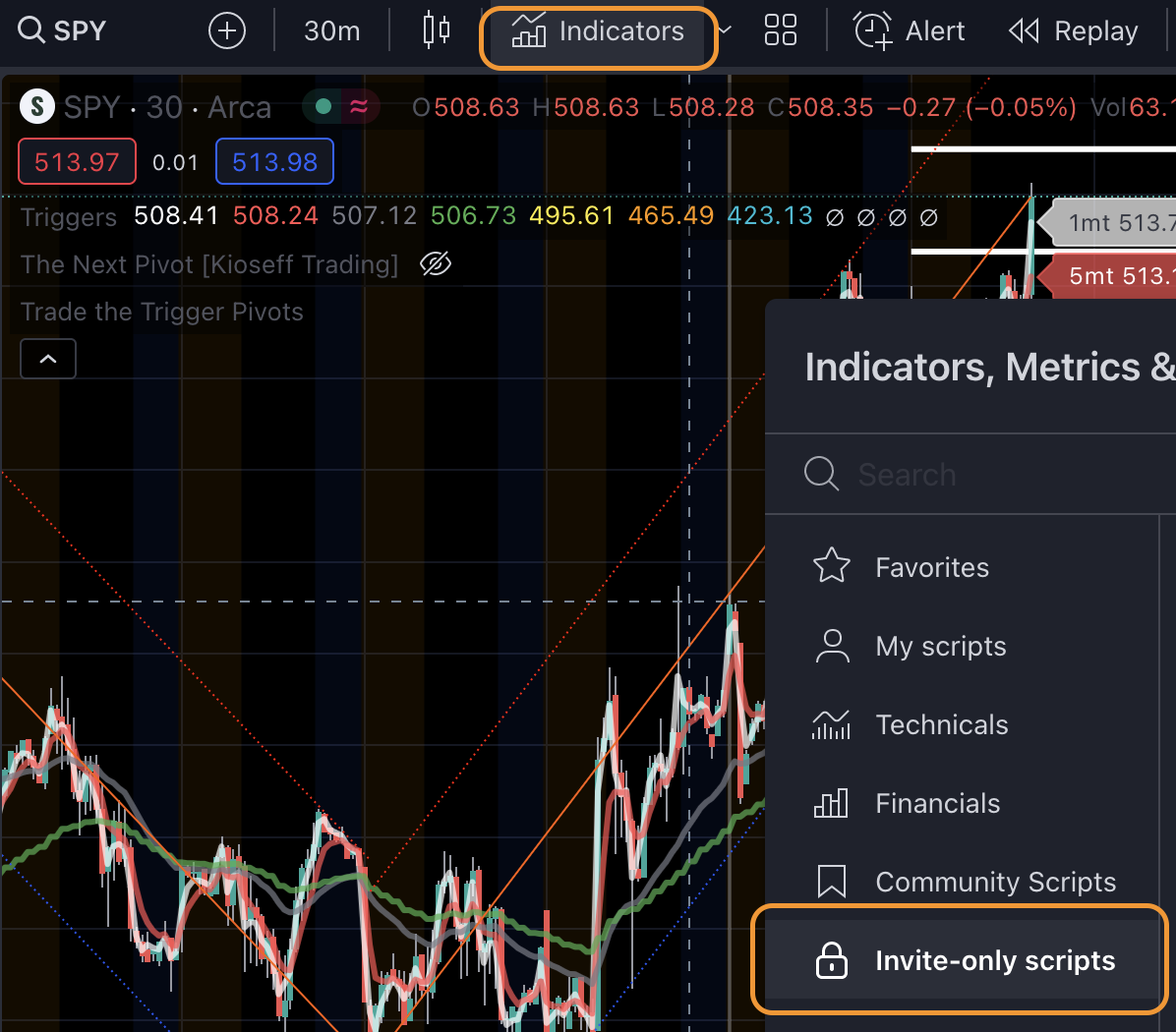
Click the “Indicators” button, then navigate to the “Invite-only scripts” pane:
How do I configure the Levels indicator?
Cap covers this well in this quick clip from one of his Twitch streams!
https://clips.twitch.tv/KnottyFairTermiteGrammarKing-PJo6tot-PM8VQ8SF
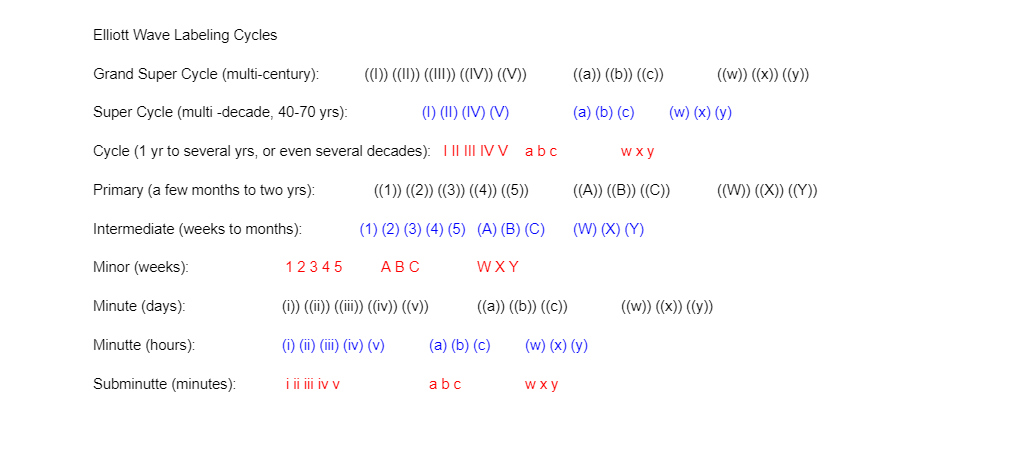
Elliott Wave Labeling Cycles - what are all of those symbols?
What is the best way to learn how to use Triggers?
The best way to learn the triggers is to:
- Watch the show! Cap goes over the triggers all day and covers many useful tips that can only be explained in the moment when certain aspects of the tool are applicable to a real life situation.
- You will find a plethora of instruction and information under the `Education` tab of your Dashboard. This is one of the most valuable resources to you as a member of Trade The Trigger!
- Ask around in the community Discord for assistance. We have hundreds active members and many of them are more than happy to explain how the triggers work best for them.
- If you have a specific request or question, not “how to triggers?”, you can create a ticket in the `support-ticket` channel in our Discord and our Support Team will try their best to assist you.
Can I connect Claude, ChatGPT, or another AI assistant to my account?
Yes. Trade The Trigger runs a public MCP (Model Context Protocol) server that any MCP-compatible AI assistant can use, including Claude and Codex. The free tools work with no account. Paid Subscriber and Pro Trader members can connect their account for live gamma data on any ticker. Connect and manage the connection at tradethetrigger.com/ai-connection/, or read the full setup guide at tradethetrigger.com/for-agents/.
Is there a rate limit on the AI assistant tools?
Yes. The free public tools allow 120 requests per hour per IP address. The live gamma tool for paid members allows 5 requests per minute and 100 per day. Both limits are generous for normal use: you would only reach them with automated or bulk calling.
Does the live gamma data my AI assistant gets match what I see in the Gamma Exposure Visualizer?
Yes, on the default settings. The live MCP tool, the Gamma Exposure Visualizer, and the weekly lookback all use the same computation engine, so zero-gamma and every other field line up. One thing to know: if you fine-tune Pro Settings in the browser, those changes apply to your view on the site only. Your assistant and the saved history both use the site defaults.
What is the AI Connection page?
AI Connection, at tradethetrigger.com/ai-connection/, is where paid members connect an AI assistant like Claude or Codex to their Trade The Trigger account, and manage or disconnect that connection. It requires an active Subscriber or Pro Trader membership and a one-time sign-in from your assistant.